
Experience San Francisco Live: Real-Time Views of the Golden Gate and Beyond
Uninterrupted Live Streaming of the Golden Gate Bridge
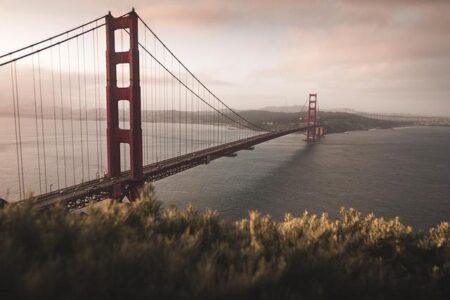
Discover San Francisco’s most famous landmark through a high-definition live webcam that offers continuous streaming from sunrise to sunset. This feed captures the Golden Gate Bridge’s striking vermilion arches as they span the sparkling waters of the bay, showcasing the steady flow of vehicles and the ever-changing weather patterns. Whether it’s the iconic fog rolling in or the vibrant hues of a sunset, this live view transforms the bridge into a dynamic spectacle of natural and architectural beauty.
Designed for both tourists and locals, the webcam includes interactive features such as:
- Zoom and pan capabilities to explore different perspectives of the bridge and adjacent city views.
- Integrated weather overlays providing real-time meteorological insights alongside the visuals.
- Recommended viewing times to catch the bridge at its most photogenic moments, like dawn’s first light or evening illuminations.
| Feature | Advantage |
|---|---|
| HD Video Quality | Sharp, clear imagery day and night |
| Live Weather Data | Instantaneous weather context |
| Interactive Viewing Controls | Personalized exploration of scenes |
Discover San Francisco’s Skyline and Landmarks Through Multiple Live Feeds
Explore the vibrant cityscape of San Francisco with a network of live cameras offering expansive panoramic views of its renowned landmarks and waterfront areas. From the sweeping vista of the Golden Gate Bridge to the lively atmosphere of Fisherman’s Wharf, these streams provide a 24/7 window into the city’s unique charm. Witness the morning fog enveloping Twin Peaks or the city lights sparkling over the Bay Bridge at night, each camera capturing a distinct facet of San Francisco’s ever-evolving scenery.
These webcams not only highlight scenic beauty but also serve as practical tools for locals and visitors by displaying current weather and activity levels. Key vantage points include:
- Golden Gate Bridge: Wide-angle views emphasizing traffic patterns and architectural details.
- Alcatraz Island: Live shots of the historic prison island with surrounding maritime traffic.
- Fisherman’s Wharf: Real-time street-level scenes bustling with tourists and local vendors.
- Bay Bridge: Nighttime views showcasing the illuminated double-deck span connecting San Francisco and Oakland.
| Camera Location | Highlight | Optimal Viewing Time |
|---|---|---|
| Crissy Field | Golden Gate with Kite Surfers | Afternoon |
| Coit Tower | Downtown Skyline | Evening |
| Treasure Island | Bay Bridge and City Lights | Night |
Utilizing San Francisco Webcams to Optimize Outdoor Plans and Events
Live webcam feeds across San Francisco are invaluable for planning outdoor activities by providing up-to-the-minute visuals of weather, crowd density, and lighting conditions. Whether you’re organizing a spontaneous hike, a picnic, or a photography outing, these streams help you make informed decisions to enhance your experience and avoid surprises.
Beyond weather monitoring, here are practical ways to leverage these webcams for your outdoor scheduling:
- Assessing Crowd Levels: Identify less busy times at popular spots to enjoy a more peaceful visit.
- Coordinating Events: Use live visuals to synchronize group activities or sports events effectively.
- Safety Checks: Spot any roadblocks, construction, or unusual occurrences that could affect your route.
- Evaluating Lighting: Plan outings around golden hour or sunset for optimal ambiance and photography.
| Webcam Location | Recommended Viewing Time | Suggested Activity |
|---|---|---|
| Golden Gate Bridge | Morning & Late Afternoon | Photography & Scenic Walks |
| Union Square | Midday | Shopping & Street Performances |
| Crissy Field | Afternoon | Picnics & Kite Flying |
Pro Tips for Capturing Stunning Visuals from Live Webcam Streams
Recording striking photos and videos from live San Francisco webcam feeds requires a combination of technical know-how and artistic vision. To ensure crisp and fluid captures, adjust your device’s screen resolution and refresh rate to match the stream’s quality. Employ screen recording software capable of real-time frame rate adjustments to maintain smooth motion, especially when filming moving elements like boats or traffic. Post-processing techniques such as tweaking brightness and contrast can further enhance images affected by fog or low light.
For those aiming to highlight the city’s dynamic character, consider these expert recommendations:
- Choose Higher Frame Rates: Capture smooth, natural movement of vehicles, watercraft, and pedestrians.
- Time Your Shots: Focus on early mornings or twilight hours to utilize soft, dramatic lighting.
- Stabilize Your Device: Use tripods or mounts even when recording screens to prevent blur from hand movements.
- Feature Local Events: Record during festivals, parades, or weather changes to add storytelling depth.
| Tip | Benefit |
|---|---|
| Adaptive Brightness Control | Enhances visibility in dim conditions |
| Reliable High-Speed Internet | Reduces lag for seamless recording |
| Keep Software Updated | Maintains compatibility and security |
| Capture Multiple Perspectives | Creates richer visual narratives |
Final Thoughts: Stay Connected to San Francisco’s Vibrant Pulse
The San Francisco Webcam Live platform offers an unmatched, real-time glimpse into one of the United States’ most celebrated cities. From the majestic Golden Gate Bridge to the lively urban skyline, this continuous live stream keeps viewers globally connected to the city’s vibrant rhythm around the clock. Whether you’re a sports aficionado, a local resident, or simply captivated by urban landscapes, this resource provides a valuable portal into daily life and special events throughout the Bay Area. For ongoing updates and expanded coverage of major sporting and travel destinations, visit ski-nordique.net and immerse yourself in the dynamic world of San Francisco.